


This is a list of variables available in custom G-Code macro language in PrusaSlicer. The macro language is described in detail in a separate page.
Placeholders for configuration options
Each configuration option can be used in all of your custom G-Codes and output filename template. The identifier of the respective placeholder is shown in a tooltip when you hover the config option in parameter tabs:
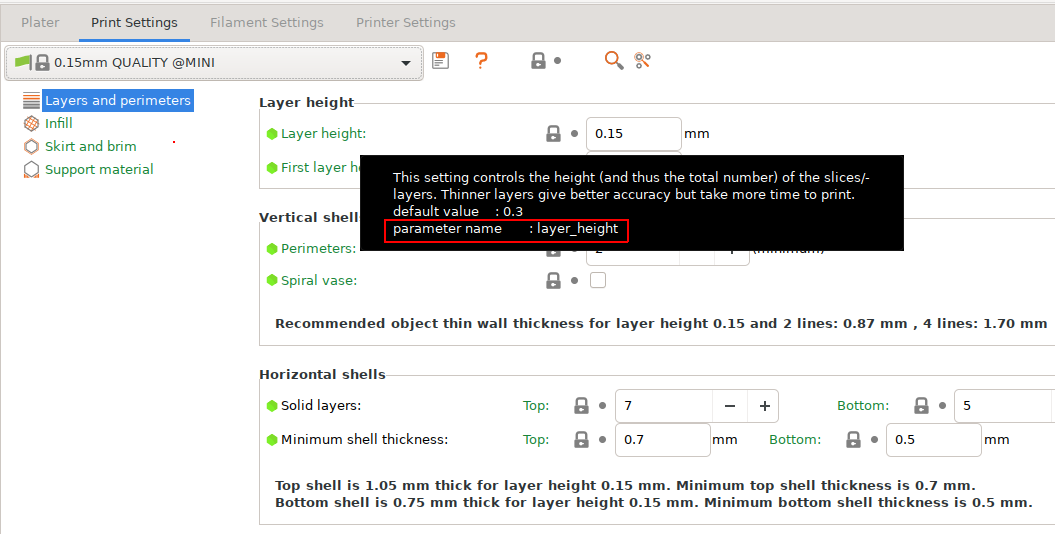
That is, using {layer_height} in a custom G-Code would expand into 0.15.
Placeholders available in all custom G-Codes
There are additional placeholders available in all custom G-Codes:
current_extruder
current_object_idx
day
filament_preset
first_layer_print_convex_hull
first_layer_print_max
first_layer_print_min
first_layer_print_size
has_single_extruder_multi_material_priming
has_wipe_tower
hour
initial_extruder
initial_tool
input_filename_base
is_extruder_used
minute
month
num_extruders
num_instances
num_objects
physical_printer_preset
print_bed_max
print_bed_min
print_bed_size
print_preset
printer_preset
scale
second
timestamp
total_layer_count
total_toolchanges
year
Custom G-Code specific placeholders
There are extra placeholders only available in certain custom G-Codes. See the table below for an overview.
| Toolchange | Before layer | After Layer | Filament Start | Filament End | End | |
| next_extruder | ✓ | ✗ | ✗ | ✗ | ✗ | ✗ |
| previous_extruder | ✓ | ✗ | ✗ | ✗ | ✗ | ✗ |
| toolchange_z | ✓ | ✗ | ✗ | ✗ | ✗ | ✗ |
| max_layer_z | ✓ | ✓ | ✓ | ✓ | ✓ | ✓ |
| layer_num | ✓ | ✓ | ✓ | ✓ | ✓ | ✓ |
| layer_z | ✓ | ✓ | ✓ | ✓ | ✓ | ✓ |
| filament_extruder_id | ✗ | ✗ | ✗ | ✓ | ✓ | ✗ |
Output filename format FDM
The macro language can be used in Output filename format field available in Print Settings -> Output options. In this context you can use all the configuration placeholders plus the following:
day
extruded_volume
filament_preset
hour
initial_extruder
initial_filament_type
initial_tool
input_filename_base
minute
month
normal_print_time
num_extruders
num_instances
num_objects
num_printing_extruders
physical_printer_preset
print_preset
print_time
printer_preset
printing_filament_types
scale
second
silent_print_time
timestamp
total_cost
total_toolchanges
total_weight
total_wipe_tower_cost
total_wipe_tower_filament
used_filament
version
year
Output filename format SLA
You can use all configuration options placeholders plus the following:
day
hour
input_filename_base
minute
month
num_instances
num_objects
objects_used_material
print_time
scale
second
support_used_material
timestamp
total_cost
total_weight
version
year
23 comments
It would be Extremely nice to be able to set a default file output format. I have multiple printer settings according to the type of printing I want to do and any change to the output format needs to be replicated by hand in every printer profiles. Having that functionality for the printer profiles by nozzle sizes would be a great addition.
I second the request to have control over where the Bed number is located.
Thanks in advance
Actually, custom naming of the beds would also be insanely useful. ;)
{input_filename_base}_{nozzle_diameter[0]},{nozzle_diameter[1]}n_{layer_height}mm_{printing_filament_types}_{printer_model}_{round(total_weight)}g_{print_time}.gcode