English
Login
3D printers
Materials
Parts & Accessories
For Business
Software
3D Models
Community
Help
Courses
Blog
Company
Support
Prusa CORE One+
Prusa CORE One+ (assembled) (1.00)
2. Unpacking the printer | Preparing the package
1. Preparing the package
Step 1 of 7 (Chapter 2 of 5)
Contents
Comments
The package fixations and foam inserts may vary.
⬢
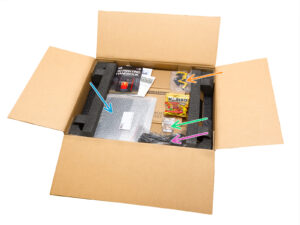
Open the package. On the top layer, you will find Haribo gummy bears, a 3D printing handbook, a welcome letter, other documentation, and these components:
⬢
Print sheet
⬢
USB drive
⬢
Power cord
⬢
Anti-vibration bars (2x) / Anti-vibration feet (4x)
Products and packaging may vary.
⬢
Remove these items from the package and place them in a safe spot for later use.
⬢
Remove the cardboard protection layer.
⬢
Take out the Prusament box and set it aside.
Loading...
Next
Contents
Prusa CORE One+ (assembled)
1. Introduction
2. Unpacking the printer
Preparing the package
Removing the box
Removing the cardboard layer
Anti-vibration feet: parts preparation
Sticking the anti-vibration feet
Removing the inside protections
Preparing the Tool pack
3. Mounting the xLCD
4. Calibration & First run
Manual changelog
Comments
Log in
to post a comment
No comments