


The Prusa CORE One/+ is equipped with a color LCD screen that, among other things, supports G-code thumbnails and QR codes.
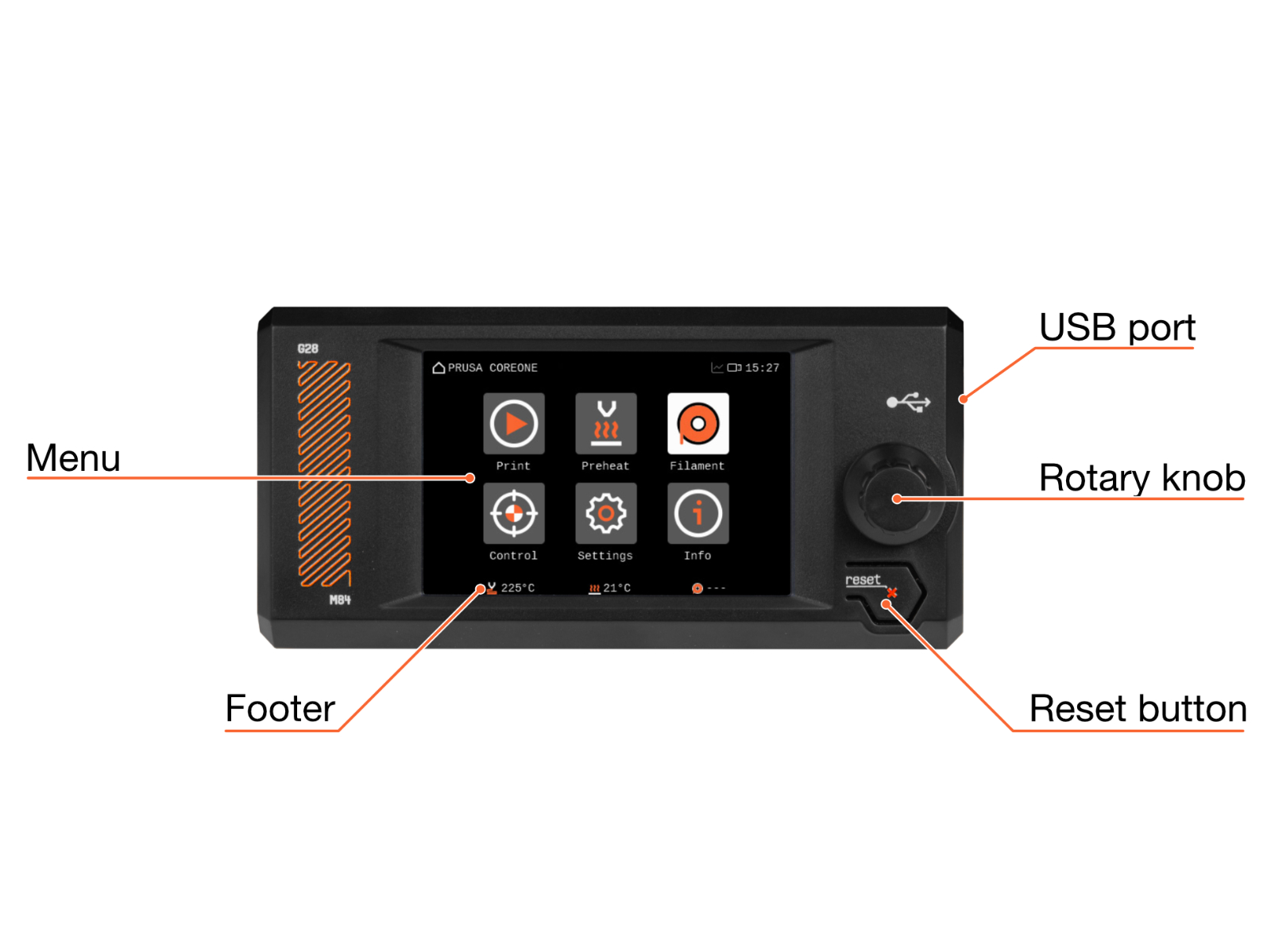
The footer of the main screen can be edited to show the features you wish to be shown on the main page.
Make sure to always have the latest firmware.
Menu structure during printing
- Tune
-
- Change Filament
- Cancel Object
- Print Speed
- Nozzle Temperature
- Heatbed Temperature
- Max Chamber Temperature
- Print Fan Speed
- Chamber Fans [Auto/0-100%]
- Chamber Fans Limit
- Filtration Fan
- Chamber Filtration
-
- Chamber Filtration
-
- None
- Adv. filtration
- DIY
-
- Minimum Power
- Post-Print Filtration
- Post-Print Duration
- Post-Print Power
- Chamber Filtration
-
- Flow Factor
- Filament Sensors
-
- Filament Sensing
- Side Filament Sensor
- Toolhead Filament Sensor
- Restore Defaults
-
- Stealth Mode
- Sound Mode
- Input Shaper
-
- Calibration
- X-axis filter
- X-axis frequency
- Y-axis filter
- Y-axis frequency
- Restore defaults
-
- Fan Check
- Verify Gcode
- Door Sensor
- User Interface
-
- Footer
- Sort Files [Time/Name]
- Print Progress Screen [OFF, 30 s - 200 s]
- Menu Timeout
- Sound Mode [Loud/Silent/Assist/Once]
- For filament change, preheat [Nozzle/Noz&Bed]
- RGB Status Bar
- Chamber Lights
- Chamber Dimming
- Touch
- Touch Sig workaround
-
- Network
-
- Active Interface [Eth/Wi-fi]
- Network status
-
- Wi-fi status
- IPv4 Address
- IPv4 Gateway
- MAC Address
- Hostname
- DNS Server
- Connect Host
- Connect IP
- Ping | Loss
- Connect
- Gateway
- DNS server
-
- Wi-Fi
-
- Wi-Fi status
- SSID
- Wi-Fi Wizard
- Protocol
- LAN
- IPv4 Address
- IPv4 Netmask
- IPv4 Gateway
- Hostname
- MAC Address
-
- Ethernet
-
- Protocol
- LAN
- IPv4 Address
- IPv4 Netmask
- IPv4 Gateway
- Hostname
- MAC Address
-
- Prusa Connect
-
- Enabled
- Status
- Error
- Hostname
- Add printer to Connect
- Load Settings
-
- Prusa Link
-
- Enabled
- User
- Password
- IPv4 address
- Hostname
- Generate Password
-
- Metrics & Log
-
- What is this?
- Allow
- Enable Stored on Startup
- Stored configuration
- Host
- Metrics port
- Log Port
- Current configuration
- Metrics Host
- Metrics Port
- Log Host
- Log Port
-
-
- Time Zone Hour Offset
- Time Zone Minute Offset
- Time Zone Summertime
- Info
- Message History
-
- Pause
- Stop
Menu structure when idle
- Preheat
-
- PLA
- PETG
- ASA
- PC
- PVB
- ABS
- HIPS
- PP
- FLEX
- PA
- Custom
- Show All
- Cooldown
-
- Filament
-
- Load filament
- Unload filament
- Change filament
- Purge filament
- Manage filaments
-
- Loaded filament
- Edit filaments
- Reorder filaments
- Enable filaments
-
-
- Control
-
- Move axis
-
- Move X
- Move Y
- Move Z
- Move E
- Cooldown
-
- Temperature
-
- Nozzle temperature
- Heatbed temperature
- Chamber temperature
- Print Fan speed
- Chamber Fans Limit
- Filtration Fan
- Cooldown
-
- Auto home
- Set ready
- Disable Motors
- Calibrations & tests
-
- 1. Fan test
- 2. Door sensor
- 3. Y axis test
- 4. X axis test
- 5. Z alignment calibration
- 6. Loadcell test
- 7. Z axis test
- 8. Heater test
- 9. Gears Calibration
- 10. Filament sensor calibration
-
- Move axis
-
- Settings
-
- Filament Sensors
-
- Filament Sensing
- Side Filament Sensor
- Toolhead Filament Sensor
- Restore Defaults
-
- Stuck Filament Detection
- MMU unit
- Camera
- Stealth Mode
- Fan check
- Verify GCode
- Chamber Filtration
-
- Chamber Filtration
- Minimum Power
- Post-print Filtration
- Post-print Duration
- Post-print Power
-
- Input shaper
-
- Calibration
- X-axis filter
- X-axis frequency
- Y-axis filter
- Y-axis frequency
- Restore defaults
-
- User Interface
-
- Footer
- Sort Files [Time/Name]
- Print Progress Screen [OFF, 30 s - 200 s]
- Menu Timeout
- Sound Mode [Loud/Silent/Assist/Once]
- For filament change, preheat [Nozzle/Noz&Bed]
- RGB Status Bar
- Chamber Lights
- Chamber Dimming
- Touch
- Touch Sig workaround
-
- Language and Time
-
- Language
-
- English
- Čeština
- Deutsch
- Español
- Français
- Italiano
- Polski
- ニホンゴ
- українська мова
-
- Time Zone Hour Offset
- Time Zone Minute Offset
- Time Zone Summertime
- Time Format
- Language
-
- Network
-
- Active Interface [Eth/Wi-fi]
- Network status
-
- Wi-fi status
- IPv4 Address
- IPv4 Gateway
- MAC Address
- Hostname
- DNS Server
- Connect Host
- Connect IP
- Ping | Loss
- Connect
- Gateway
- DNS server
-
- Wi-Fi
-
- Wi-Fi status
- SSID
- Wi-Fi Wizard
- Protocol
- LAN
- IPv4 Address
- IPv4 Netmask
- IPv4 Gateway
- Hostname
- MAC Address
-
- Ethernet
-
- Protocol
- LAN
- IPv4 Address
- IPv4 Netmask
- IPv4 Gateway
- Hostname
- MAC Address
-
- Prusa Connect
-
- Enabled
- Status
- Error
- Hostname
- Add printer to Connect
- Load Settings
-
- Prusa Link
-
- Enabled
- User
- Password
- IPv4 address
- Hostname
- Generate Password
-
- Metrics & Log
-
- What is this?
- Enable Metrics
- Host
- Metrics Port
- Syslog Port
- MAC Address
- Metrics List
-
-
- Hardware
-
- Printhead
-
- Nozzle diameter
- Nozzle hardened
- Nozzle high-flow
- Nextruder Silicone Sock
- Nextruder [MMU/Stock]
- Calibrate Filament Sensors
-
- Filament Autoloading
- Door Sensor
- G-code checks
-
- Nozzle [Warn/Strict/None]
- Printer Model [Warn/Strict/None]
- Firmware Version [Warn/Strict/None]
- G-code Level [Warn/Strict/None]
-
- Display Refresh Speed [High/Low]
- Printhead
-
- FW update
- System
-
- Save Crash Dump
- Save Logs To File
- Device Hash in QR
- Load Settings from File
- Factory Reset
-
- Reset Settings & Calibrations
- Hard Reset (USB with FW needed)
-
-
- Filament Sensors
-
- Info
-
- Network Status
-
- Wi-Fi Status
- IPv4 Address
- IPv4 Gateway
- MAC Address
- Hostname
- DNS Server
- Connect Host
- Connect IP
- Ping | Loss
- Connect
- Gateway
- DNS Server
-
- Sensor Info
-
- Board Temperature
- MCU temperature
- Bed Temperature
- Chamber Temperature
- Nozzle Temperature
- Heatbreak Temperature
- Loadcell Value
- Door Sensor
- Filament Sensor
- Side Filament Sensor
- Print Fan
- Heatbreak Fan
- Chamber Fan 1
- Chamber Fan 2
- Filtration Fan
- Heater Voltage
- Input Voltage
- Heater Current
- Input Current
- MMU current
-
- Version Info
-
- Firmware Version
- Bootloader version
- Buddy Board
- Serial Number
- Love Board
- xLCD
-
- Print Statistics
-
- Fail Stats
-
- Power failures
-
- Statistics
-
- X Axis
- Y Axis
- Z Axis
- Filament
- MMU filament loads
- Print Time
-
- Fail Stats
-
- Network Status
-
Was this article helpful?
This action is available only to registered users. Please log-in.
5 comments
I am trying to solve a Filament Sensor Calibration problem. Clearly stated sensor information would help.
The latest "Chamber Filtration" menu changes (C1+ FW 6.4.0) are missing:
- Filter Usage
- Change Filter
- Print Filtration
I'm especially interested in the "Print Filtration" setting and searching a while for it now.
Found this promising page but nope:
- This point missing
- No descriptions to the individual points (links to detail pages would be nice!)
Found the "Print Filtration" description on https://help.prusa3d.com/article/advanced-filtration-system-for-prusa-core-one_887189
Prusa, you are failing. If you build a printer for the masses, you need to do more to fill in all these usability gaps.
What about some of the filament settings? Can I change the purge amount?
What difference does the hardened nozzle make? What about high flow?
I still don't know what a lot of these options mean. The one time I set my printer to 300%, I crashed it and scratched the bed because the bolts in the print-head loosened and it wobbled and struck the print.
I had to take the fan off and tighten up a lot of the bolts behind the fan because the print-head and its been fine since, but some warning would have been nice.
A thing I'd love to know is if I could use locktight or something else to firm up the bolts and prevent them from coming loose so I can do very fast drafting prints...
...Or is that setting just kinda doomed to cause harm?
I genuinely have no idea and its not in the print manual anywhere and skimming the forums has also not been particularly fruitful either.