English
Login

Multiple build plates on PrusaSlicer

Relevant for

MK4 family
XL family
MMU family
PRO family
MINI family
+
14 comments
Article is also available in following languages
English
Čeština
Polski
Deutsch
Français
Español
Italiano
日本語

Starting from PrusaSlicer version 2.9.0, you can work on multiple build plates. This functionality allows users to manage many objects efficiently and better organize their projects. The main advantages are:

  • Organizing objects into groups across multiple beds (up to 9)
  • Automatic arrangement of objects
  • G-code preview for individual beds
  • Comprehensive statistics for all beds
  • Bulk slicing and exporting
All the beds use the same configuration, so it is not possible to have an MK4S bed next to a MINI+ bed, for example.

Adding or removing beds

There are no buttons to add or remove beds. To add a new bed, you can drag the model from the plate being used outside of the bed, and the new bed will show up. Removing the object will remove the extra beds.

It is possible to organize objects in groups into up to nine beds. The beds can be added or removed as needed. One bed is always active, and you can select the active bed by clicking on it. All actions taken, like "Import STL" and similar are processed on the active bed.


Single-click automatic arrangement

There are two different Arrange buttons on the top menu. The Arrange [A] button arranges all objects independent of the bed they are on. If the objects don't all fit the bed, new beds will automatically be added, and the objects will be divided among them. The objects are always arranged so they occupy the least amount of space. If you have objects spread around multiple beds, this button will place them in the smallest possible space and might remove extra plates.

The Arrange current bed [D] will only arrange the active bed at that moment, including objects only partially on it.


G-code preview

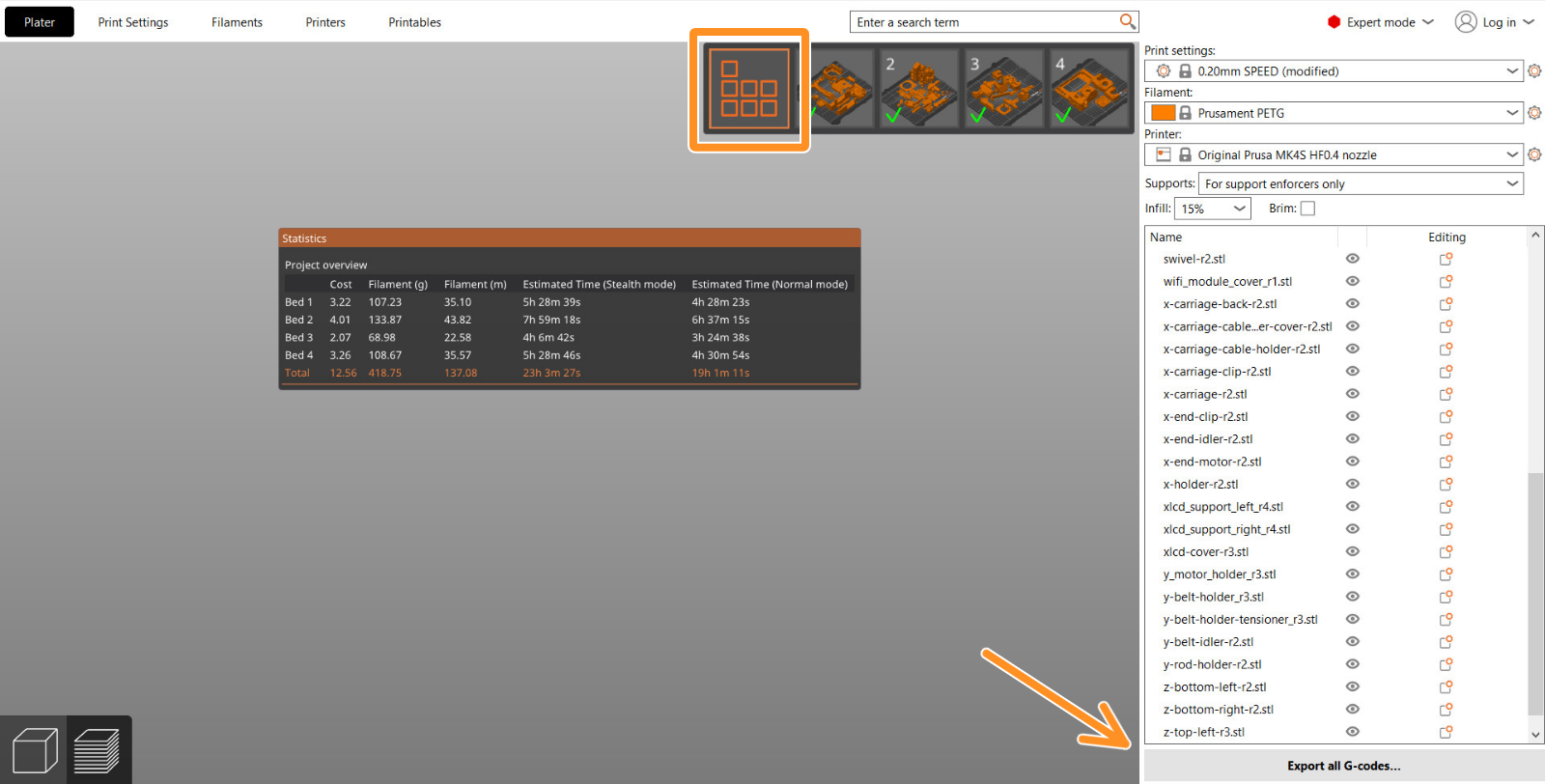
On the preview, click on a bed to make it the active bed. This will show individual beds so each bed can be viewed individually. This includes comprehensive statistics for all beds, including material usage and print time breakdowns.

Even if only one bed is active, all objects in the project are sliced. On the top right of the screen, there is a selector toolbar where you can move between the beds.

The 'Sliced Info' statistics and 'Export G-code' buttons on the right panel are related to the currently active bed.


Exporting

It is possible to export the G-code for all beds simultaneously and queue them for Prusa Connect. For that, go to "Slice All" in the Preview, and select "Export all G-codes..."
Version compatibility

PrusaSlicer ensures compatibility if a project is opened in a version before 2.9.0 by inferring bed positions from object placements in 3MF project files, allowing new projects to load in older versions even if they do not have multiple build plates. Older projects with virtual beds are adjusted in PrusaSlicer 2.9.0 to fit within the actual bed grid.

Was this article helpful?
This action is available only to registered users. Please log-in.
 

8 comments

Log in  to post a comment
rekahsoft
I know there is another comment about this but wanted to add - why is there a hard limit of 9? I'd like to add as many as I'd like (which I don't see why this wouldn't be possible).
Eliwaz Moonsfire
I do not see a way to use this to help when upscaling a print size this could be used with that as well too to help in speeding up the cutting fitting of said object. Go great with the generate thing to join them too as well. I would hope this has already been thought of an is in the works as it would help so very many that don't own a bigger printer or do and need to go much bigger would save a whole lot of time.
Kurt Gluck
Would very much like to be able to have different print settings by bed. This would make it useful when coordinating all of the parts in a large. build that have different requirements
Dimitris
Hello everyone!
PrusaSlicer 2.9.2
Every G-code file contains this text at the top:
; external perimeters extrusion width = 0.40mm
; perimeters extrusion width = 0.40mm
; infill extrusion width = 0.40mm
; solid infill extrusion width = 0.40mm
; top infill extrusion width = 0.40mm
; support material extrusion width = 0.35mm
; first layer extrusion width = 0.40mm
However, if multiple platess are required and each plate is saved as a separate G-code file, this G-code file will contain the above text multiple times, one below the other, i.e., plate-1-gcode once, plate-4-gcode four times, etc.
Is this intentional?
Petr Kubiš
Hi, I cannot reproduce the issue you are talking about. Every file has just a single block of these keys.
I have tried both a single export and the 'Export all gcodes' option.
If you face this issue repeatedly, please report it on our GitHub (https://github.com/prusa3d/PrusaSlicer/issues) with reproduction steps and the resulting G-code files
Tibor Macek
Can you add a setting for more then 9 build plates? I'm trying to print a lot of parts and 9 build plates is not enough.
Petr Kubiš
Hi, thank you for your feedback. This was a starting point for the feature's first implementation from our side, and we may need to increase it in a future release as people start creating bigger projects.
ApatheticKoala
Petr, can you comment on if Prusa Slicer 3.0 will have more build plates available?

I designed a board game organizer and when separating the parts by colour for 3D printing I'd need 13 build plates. I mainly want this as the Prusa "3D Printing Price Calculator" is a manual process of loading each STL. Honestly the "3D PPC" may currently be broken as the while print time will load in, the grams of filament will not. I tried with files sliced for Prusa Mini+ and I3 MK3S+.