Article est également disponible dans les langues suivantes
L'erreur Echec bed leveling apparaît lorsqu'il y a un problème avec la dernière étape de la calibration. Cette calibration est la dernière étape de la calibration XYZ et est effectuée avant chaque impression.
Pour les imprimantes MK2.5/MK2.5S qui ont la SuperPINDA d'installée, vous DEVEZ utiliser la version 3.9.2 ou supérieure du firmware !
Il peut y avoir trois messages d'erreur différents lié à l'Echec bed leveling :
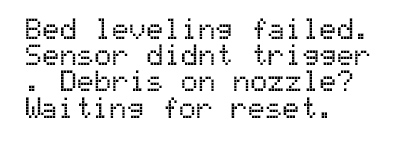
Capt. non declenche. Debris sur buse ? En attente d'un reset.
Capt. declenche trop trop haut. En attente d'un reset.
Capteur deconnecte ou cable casse. En attente d'un reset.
Dépannage
"Capt. non declenche. Debris sur buse ? En attente d'un reset."
Assurez-vous que la buse et le plateau chauffant sont exempts de plastique.
Effectuez la calibration Z via le Menu LCD - Calibration - Calibrer Z, qui nivelle également l'axe X.
Essayez de reprendre la calibration ou de redémarrer l'impression (selon le moment où l'erreur s'est produite).
Vérifiez visuellement le câble de la sonde PINDA, recherchez tout collier de serrage trop serrée qui pourrait empêcher la sonde P.I.N.D.A. de fonctionner correctement.
I bought a MK2S kit version in June 2018 .I had great pleasure to assemble it and it worked fine until recently ( among others, I made 260 face mask last year.) Actual firmware is 3.2.3 Rambo E13 a. E3Dv6 full ? Wat is it Prusa slicer2.2.0 +-20200321132 Never changed Pinda; I assume it was V1
I receive following message: Error message ; Bed leveling failed Sensor disconnected or Cable broken. Waiting for reset. Which cable? The cable of the Pinda ? I assume the sensor is the Pinda; When I approach a metal piece close to the Pinda the led goes off, even if I move everything : so I assume it is working correctly.
I have also opened the rambo case and everything seems ok.
I tried V2 calibration gcode and printer stops : Bed leveling failed… I bought another Pinda in China but without any improvement I tried also to flash again the firmware but is it the right one because during startup I have to wait 120 seconds because the Pinda is heating ( with a three wire device? ) In the beginning with first firmware there was no heating of the Pinda
Results of tests 1) Autohome OK… 2) Self test OK 3) Calibration XYZ ok I assume that Pinda is working correctly after that ? 4) First layer calibration fail
5) Skew I checked skew: and had to correct it somewhat I assume that if am able to correct that Pinda is still 100% ok? Skew is 0,19 left 0,01 Center à,08 right 0,16
6 Bed leveling failed
Sensor disconnected or Cable broken 7 ) Checked temp calibration 50-60-70-80-90-100 ° ok
I don’t know anymore what else I can do? Please help!
Hello, Thank you for your comment. Please, reach out to our tech. support with the video of the calibration of the Z axis or start of the print (first layer calibration) to our email: [email protected].
Hi! Does the probe turn off the small red light on top of it when you put a metal object underneath the sensor? This issue might have a different cause depending on the priner model you are using. Check if there is any mechanical issue causing it. If not, try re-calibrating the PINDA probe height.


2 commentaires
I bought a MK2S kit version in June 2018 .I had great pleasure to assemble it and it worked fine until recently ( among others, I made 260 face mask last year.)
Actual firmware is 3.2.3 Rambo E13 a. E3Dv6 full ? Wat is it
Prusa slicer2.2.0 +-20200321132
Never changed Pinda; I assume it was V1
I receive following message:
Error message ; Bed leveling failed
Sensor disconnected or Cable broken. Waiting for reset.
Which cable? The cable of the Pinda ?
I assume the sensor is the Pinda;
When I approach a metal piece close to the Pinda the led goes off, even if I move everything : so I assume it is working correctly.
I have also opened the rambo case and everything seems ok.
I tried V2 calibration gcode and printer stops : Bed leveling failed…
I bought another Pinda in China but without any improvement
I tried also to flash again the firmware but is it the right one because during startup I have to wait 120 seconds because the Pinda is heating ( with a three wire device? ) In the beginning with first firmware there was no heating of the Pinda
Results of tests
1)
Autohome OK…
2)
Self test OK
3)
Calibration XYZ
ok
I assume that Pinda is working correctly after that ?
4)
First layer calibration
fail
5)
Skew
I checked skew: and had to correct it somewhat I assume that if am able to correct that Pinda is still 100% ok? Skew is 0,19
left 0,01
Center à,08
right 0,16
6
Bed leveling failed
Sensor disconnected or Cable broken
7 )
Checked temp calibration 50-60-70-80-90-100 ° ok
I don’t know anymore what else I can do? Please help!
Thank you for your comment. Please, reach out to our tech. support with the video of the calibration of the Z axis or start of the print (first layer calibration) to our email: [email protected].
Hi! Does the probe turn off the small red light on top of it when you put a metal object underneath the sensor? This issue might have a different cause depending on the priner model you are using. Check if there is any mechanical issue causing it. If not, try re-calibrating the PINDA probe height.