


The Prusa USS Drybox is designed to keep filament in a low-humidity environment during printing. It is designed to slow moisture absorption by the inserted filament spool, using desiccant silica gel packets.
The Drybox is a transparent, sealable polypropylene container compatible with the Prusa printers (except MINI/+ and MMU). Its main advantages are simplicity, lightweight design, secure sealing, and the option to mount it directly onto the printer.
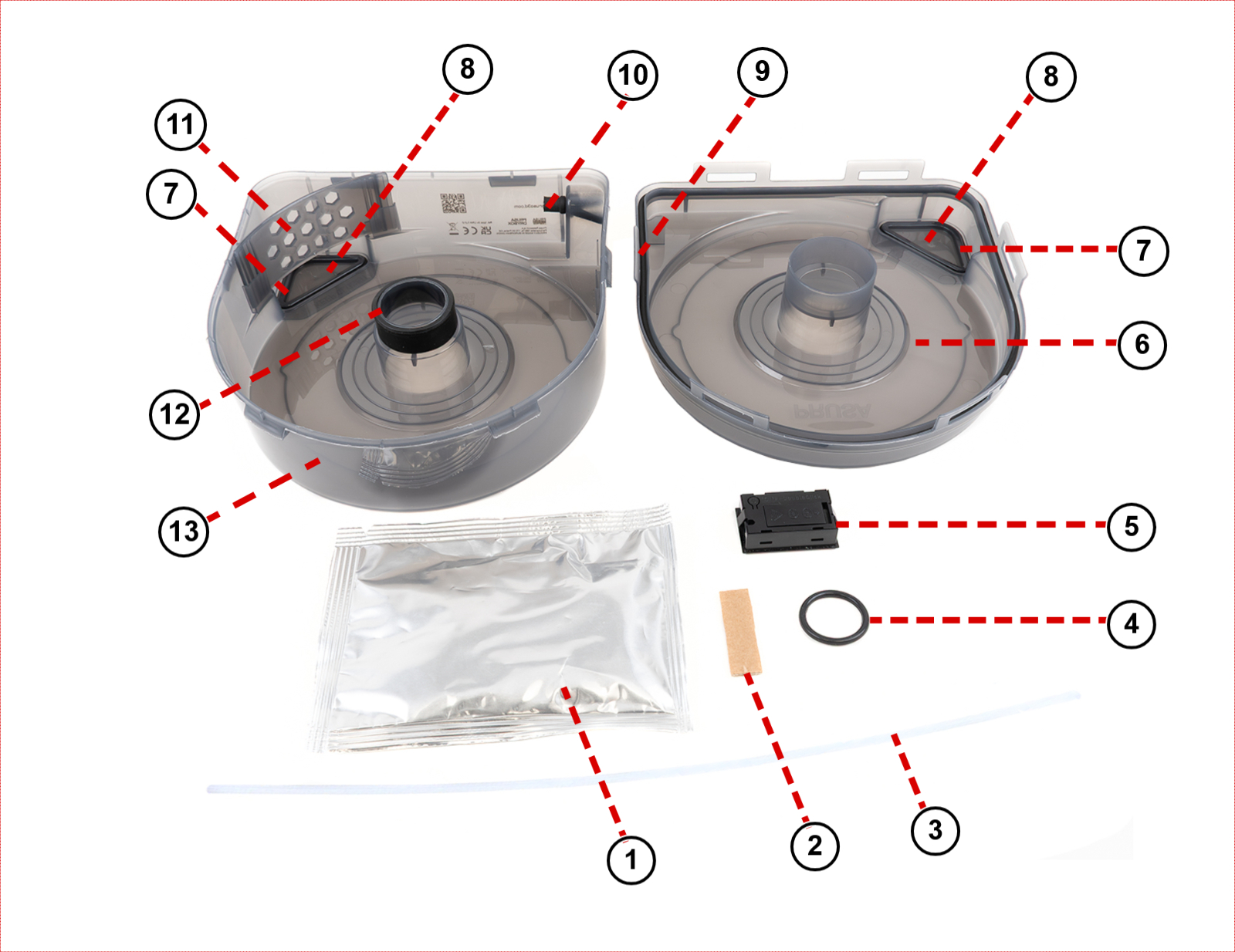
Components
The drybox is made of the following parts:
| 1. Dessicant in an aluminium sealed pack | 8. Removable caps |
| 2. Material labels | 9. Outer seal (do not remove) |
| 3. PTFE tube | 10. Grommet (do not remove) |
| 4. O-ring for printed spoolholder | 11. Rib (do not remove) |
| 5. TPM40 hygrometer | 12. Inside seal (do not remove) |
| 6. Top | 13. Bottom |
| 7. O-ring seal for caps |
Managing humidity
The Prusa USS Drybox uses silica gel to maintain low internal humidity. You can monitor the humidity level using the built-in digital hygrometer or an optional indicator card (purchased separately).
- Monitoring: The hygrometer shows internal temperature and relative humidity (RH).
- Maintenance: Silica gel absorbs moisture and should be replaced or regenerated if the relative humidity (RH) exceeds the maximum recommended value for the material.
- Stabilization: Note that the humidity value may take some time to decrease and stabilize (up to 1 hour).
- Manual rotation: There are small covers on both sides of the Prusa USS Drybox that allow manual spool rotation without opening the lid. Use them only when necessary and avoid keeping them open for extended periods. Always ensure they are properly closed afterward, as improper or frequent opening increases internal humidity.
- Sealing: Improper sealing can lead to increased internal humidity. We recommend visually inspecting the seal each time. Avoid unnecessary opening to maintain stable humidity.
| Filament type | Maximum recommended RH (%) (measured on the hygrometer) |
|---|---|
| PLA | Below 30% RH (short-term tolerance up to 40%) |
| ABS | Below 30% RH (ideally below 15%) |
| ASA | Below 30% RH (ideally below 10%) |
| PETG | Below 20% RH |
| TPU | Below 20% RH (ideally <15%) |
| PVA | Below 20% RH |
| PC | Below 20% RH |
| BVOH | Below 20% RH |
Setup and first use
To assemble the USS Drybox, follow the instructions in the dedicated article First setup and filament loading (USS Drybox).
When the filament is not in use, seal the filament guide using the included grommet.
Installation on printer and PTFE tube cutting
Before starting, adjust the PTFE tube length to the size recommended for your printer.
To cut the PTFE tube, we recommend using any tool that slices cleanly. Avoid tools that crush, deform, or slip during cutting, such as scissors or cutting pliers, as they may deform the tube and increase filament friction. We recommend using a sharp box cutter or knife for a clean, straight cut.
If you are unable to make a straight cut manually, you can use a dedicated PTFE cutting guide available on Printables.com.
The Prusa USS Drybox should be mounted directly on the printer using dedicated holders available on Printables. These holders are specific to various printer models and utilize a puck-and-bayonet system for easy attachment.
Choose your printer for specific installation instructions:
- CORE One L and CORE One+ (identical installation procedure)
- CORE One
- XL
- HT90
- MK series
Maintenance
- Replace silica gel when needed.
- Clean with low-pressure compressed air only.
- Inspect seals before each use.
- Do not expose components to extreme conditions or sunlight.
- Remove batteries if unused for long periods.
- Replace batteries (2x LR44) if the hygrometer stops working.
TPM40 Hygrometer specifications
- Temperature range: -50 °C to +70 °C
- Humidity range: 10%–99% RH
- Accuracy: +/-1 °C, +/-3% RH
- Power: 2x LR44 batteries
- Battery life: ~2 years
Battery installation:
- Open battery cover.
- Insert 2x LR44 batteries (correct polarity).
- Device powers on automatically.
Compatible filament spools
Prusament spools are fully compatible with the Prusa USS Drybox out of the box. This includes both the new spool design featuring the Open Print Tag and the older design without it.
Buddy3D spools are also fully compatible and require no adjustments.
Spools from third-party manufacturers (such as Polymaker, Elegoo, Sunlu, Hatchbox, Fillamentum, and others) may require adapters, especially cardboard spools. For these cases, we recommend the printable parametric spool adapters created by community member Dave G., available on Printables.