


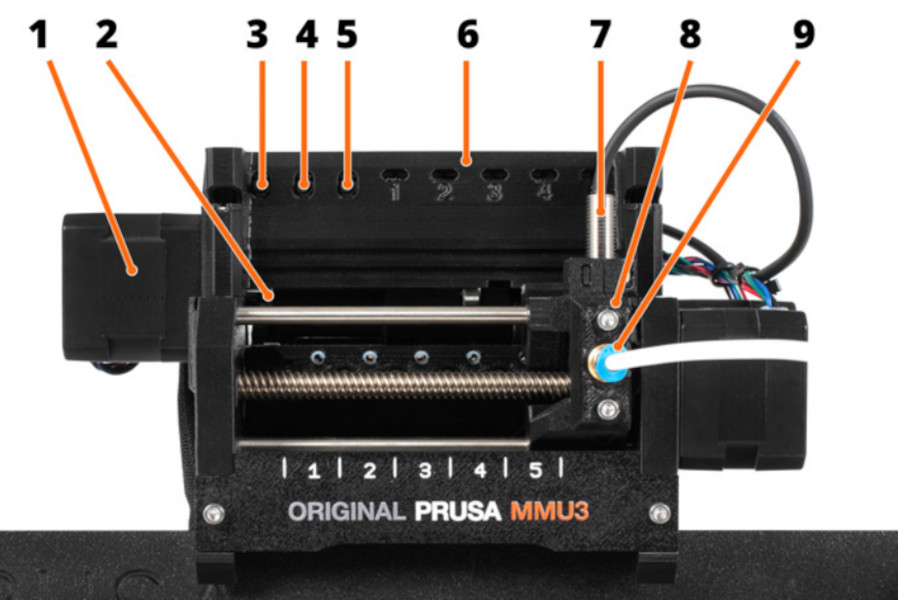
- Idler motor - rotates the idler.
- Idler - contains five pulleys. By rotating the idler, a single pulley gets in direct contact with the filament and applies pressure on it. Then, the pulley motor can push the filament forward into the selector.
- Left hardware button - moves the selector left.
- Middle hardware button - preloads filament into the selected position.
- Right hardware button - moves the selector right.
- LED indicators - indicate the current status of the MMU (selected position, errors, etc.)
- SuperFINDA (or FINDA for short) - MMU3 filament sensor built into the selector.
- Selector - selects a filament slot by moving to the requested position. Filament is then pushed through the Selector into the nozzle by the Pulley Motor.
- Fitting - There are two fittings on the front PTFE tube. The other one is mounted to the top of the extruder. The color of the fittings may vary.
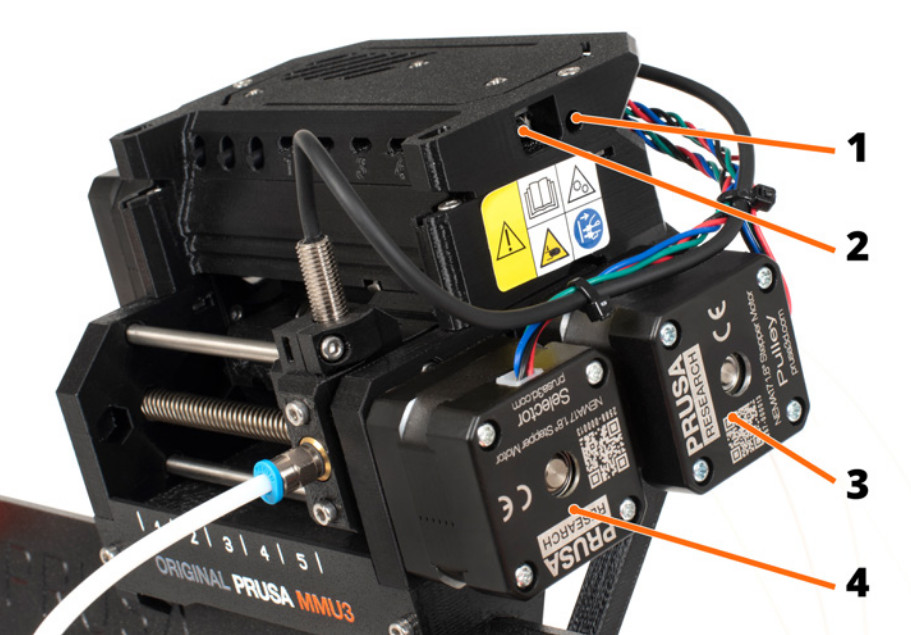
- Reset button - triggers reset of the MMU3 unit only.
- MicroUSB port - for flashing MMU3 firmware via PC.
- Pulley motor - rotates the pulleys that move the filament inside the MMU3 unit.
- Selector motor - moves the Selector left and right.
¿Te resultó útil este artículo?
Esta acción está disponible solo para usuarios registrados. Por favor inicia sesión.
Inicia sesión para publicar un comentario
Sin comentarios