


What happened?
The printer with the xBuddy board is equipped with a safety mechanism to detect power supply overcurrent situations in the Multi-material unit (MMU) connection. Upon detecting overcurrent, the printer automatically cuts off power and communication to the MMU unit as a preventive measure against damage.
Error name: MMU Overcurrent
Error code: #31310 (CORE One) #35310 (CORE One L) #26310 (MK4S) #13310 (MK4) #27310 (MK3.9S) #21310 (MK3.9) #28310 (MK3.5S) #23310 (MK3.5)
I don't have an MMU installed
If you haven't installed an MMU, make sure to disable the MMU functionality in the printer's menu in Settings -> MMU Enable. However, if you still face this issue with the MMU option being turned off, it might indicate a damaged component on the xBuddy board. Please reach out to Customer support for assistance.
How to fix it?
First, ensure the printer is running firmware 6.2.3 or newer. If the issue persists, try a hard factory reset.
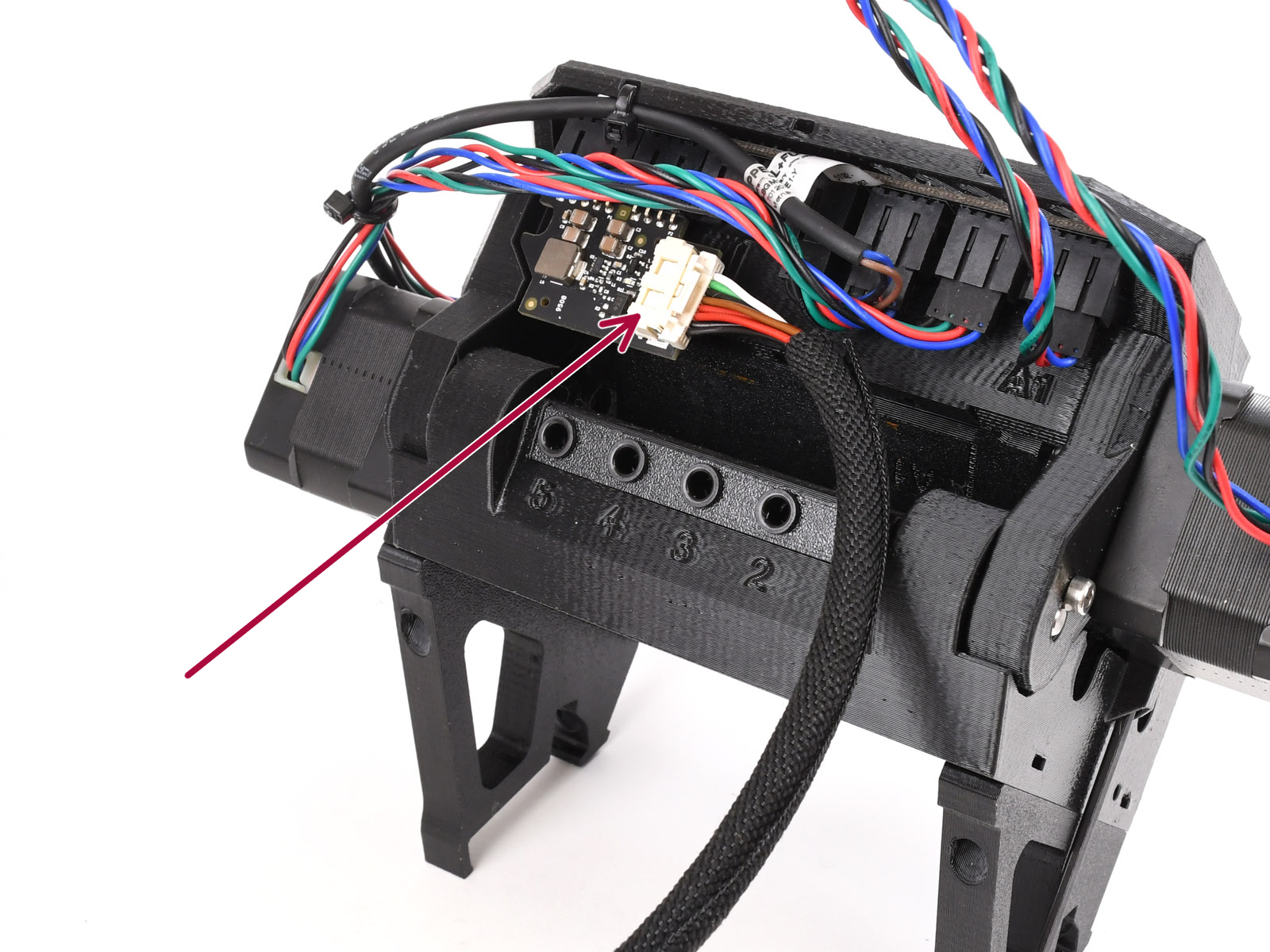
If even after updating the firmware, the issue persists, inspect the MMU, Printer cable, and PD board for any signs of damage. Check the cable's path to the xBuddy board for any broken or pinched parts.
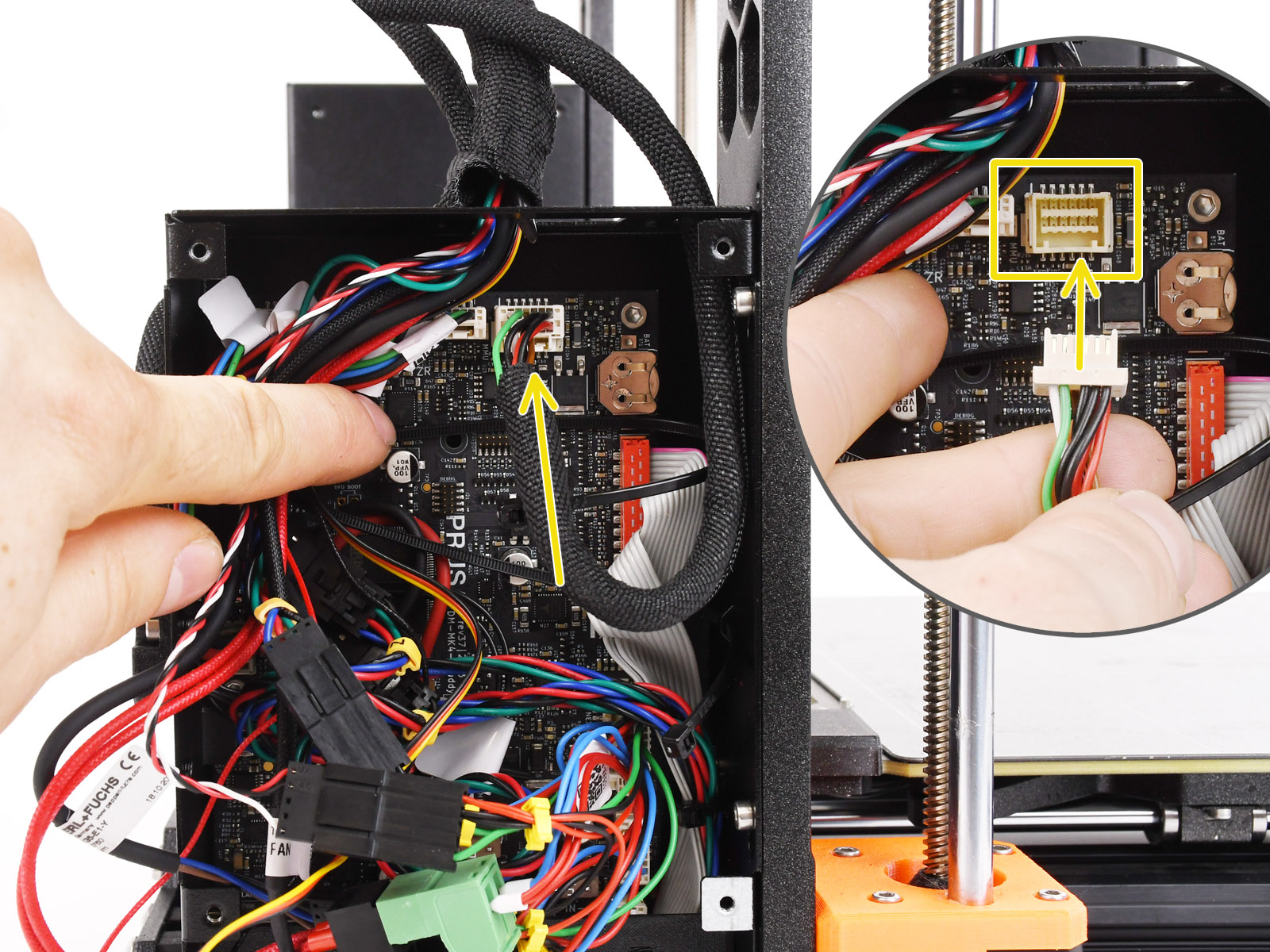
If there's no visible damage, ensure the cable connections to the MMU PDU and the xBuddy board are secure.
To troubleshoot, first disconnect the MMU cable from the xBuddy board, go to the printer menu in Settings -> MMU Enable, and set the MMU to off. Verify if the printer operates correctly with the MMU unit disconnected and the MMU functionality turned off. After confirming this, reconnect the MMU and test the printer with the MMU turned on.
In rare cases, this error message might be shown due to a damaged xBuddy board. Try checking the board for any signs of damage.
 |  |
Technical information
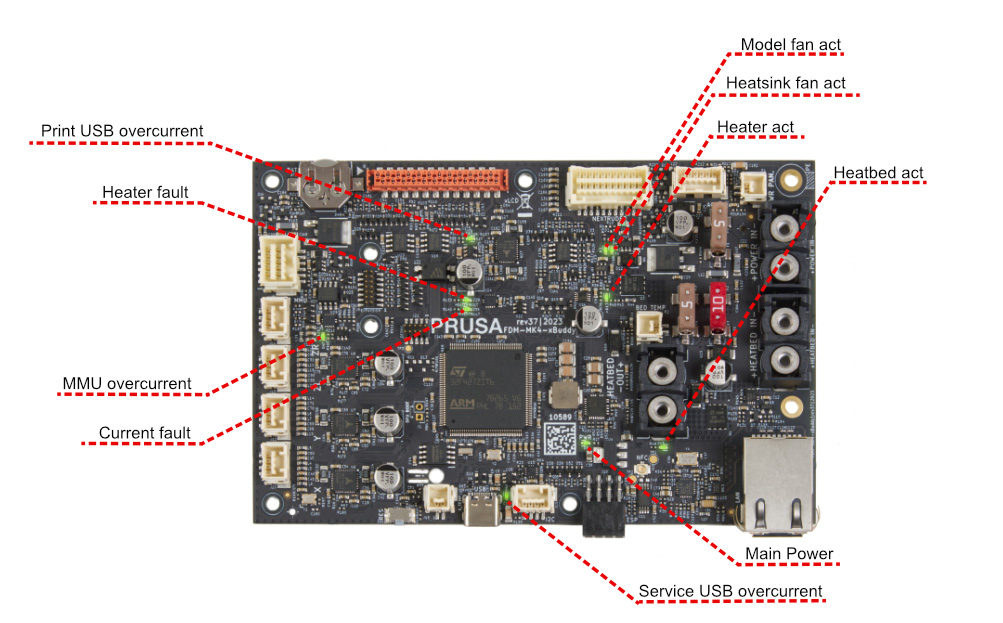
The xBuddy board is constantly monitoring the current flowing through the electronics. If the power draw exceeds 3.6A on the MMU connector's power line, the printer will display this error, and the corresponding LED indicator on the xBuddy board will illuminate. A potential overcurrent condition is likely to occur after the first startup, as power demand peaks while capacitors are charging.
The xBuddy board is designed with the capability to fully manage power delivery to the MMU unit, incorporating a software feature to mitigate such overcurrent scenarios. However, this function is specifically calibrated for the original MMU3 unit. In certain unsupported hardware configurations, this may result in a false error indication.
26 comments
If I leave the machine powered off for a while, the next startup usually fails with an MMU overcurrent warning. The workaround is always the same:
Open the electronics box.
Disconnect the MMU cable.
Power the printer on.
Power it off again.
Reconnect the MMU cable.
Power it back on.
After doing that, the MMU starts working normally again.
I have tried several firmware versions, but the issue remains. The printer and MMU are otherwise working correctly once it gets past this startup problem.
Very annoying.
I am having a MK4S+MMU3 last version of today (june 2026).
Sole solution for me : power off during, at least, 10 mn before restarting.
please prusa, we are not the sole to have this problem, maybe it is time to patch, don't you think ?
Then I flashed (downgraded from 6.4.0) the FW with the below mentioned:
FW 6.2.3-alpha >>> NO ORANGE SCREEN > THAT FINALLY WORKED!
That FW on Github appears to be a PRUSA hotfix for the issue from early 2025
Then someone inside PRUSA should actually know exactly what was fixed and why?
Off course it is not acceptable that you always have to keep an old and odd version of the FW
Everyone should be able to use the latest FW as is the promise of PRUSA
So I still will proceed with exchanging the xBuddy (PRUSA sending me a new one)
Flash that one to FW 6.4.0, and see if that also resolves the overcurrent issue
As on Github it is mentioned that there were slight component changes (I don't know if that is on the xBuddy, pd-board or MMU3 board) I will picture both sides of the New and my original xBuddy board (Post here if I can ) as to see if I can Identify which components were actually changed (But that should the actually already be know at PRUSA shouldn't it? (rhetorical))
Also my original buddy is already a rev 37|2023 is that actually the latest?
The Overcurrent Alerts are back
So flashing back to FW 6.4.0. and wait for the replacement xBuddy
Is there anyone, with same issue that can confirm my measurement?
PRUSA is now sending me a new xBuddy (Already have the V37, and 6.4 FW (also tried the downgrade FW 6.2.x without resolution of issue) so I really doubt this is the solution)
Will try reseating the PD too as per bottom of this thread