English
Login

Negative volume

Relevant for

MMU family
MINI family
MK3 family
OLD PRODUCTS
SOFTWARE
27 comments
Article is also available in following languages
English
Čeština
Polski
Deutsch
Français
Español
Italiano
日本語

The negative volume lets you subtract one mesh from another.

That way you can, for example, create easily resizable holes directly in PrusaSlicer.

Right-click on a model and pick Negative volume from the context menu. Then select the negative volume shape. You can either pick one of the basic shapes (cube, cylinder, sphere), pick one from the Shapes Gallery or use Load... to import a custom mesh.
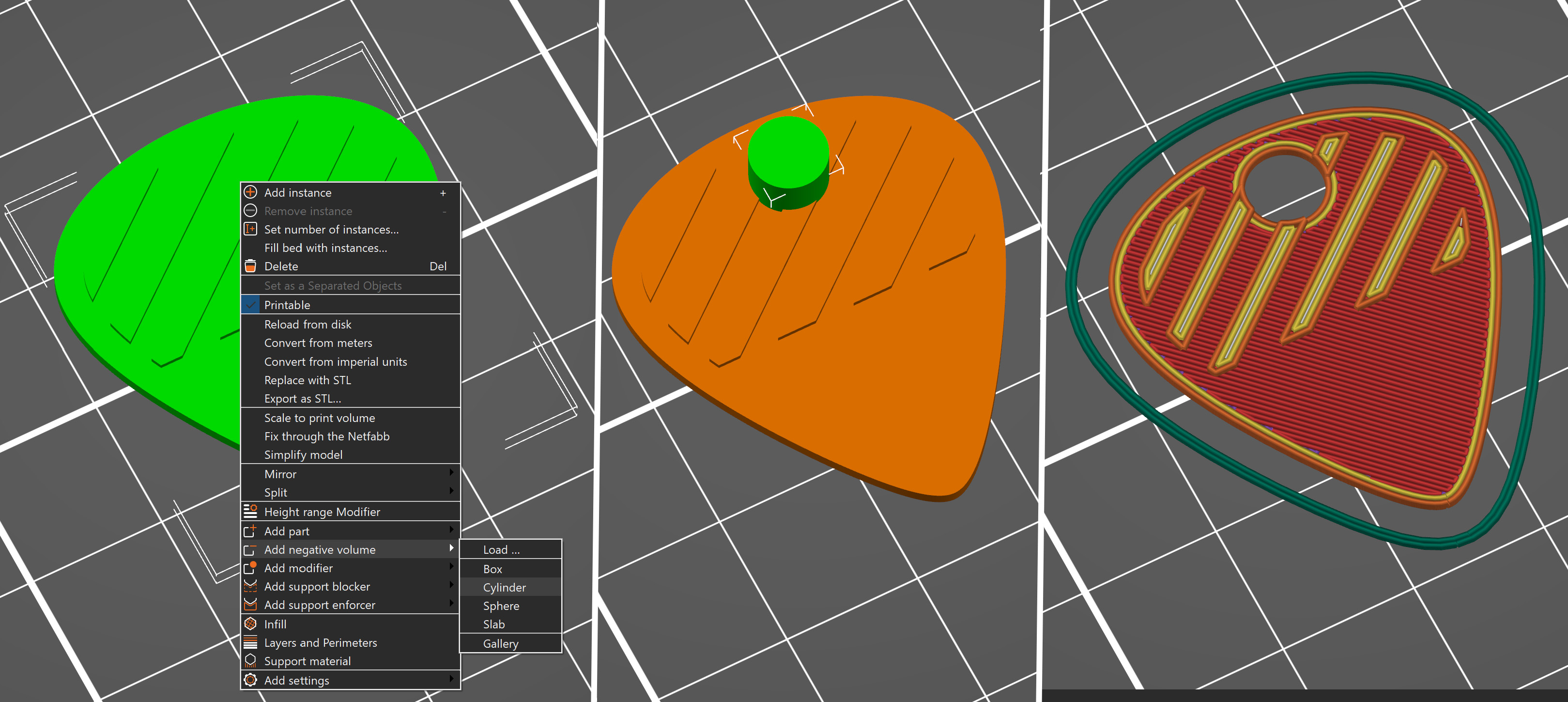
The subtraction of the negative volume happens during slicing, the actual model geometry is not modified. That means it is not possible to export an STL with the subtracted negative volumes.

Was this article helpful?
This action is available only to registered users. Please log-in.
 

16 comments

Log in  to post a comment
Chris
It is possible to export a STL file with a negative volume. It can then be imported and the mesh that was encompassed by the negative volume will be gone as well as the negative volume part.
Now, that said, I have recently encountered a problem exporting a part as a STL file that has negative volume components. The part exports but there is no negative volume, just the complete mesh of the part. However, other parts, in the same 3MF file do export with the negative volume parts.
I have tried to debug this by exporting the part that failed and a part that didn't fail as 3MF files and importing them into FreeCAD. I found that FreeCad imported the failed part as if there was no negative volume with the part; whereas, the part that didn't fail was imported with mesh (positive volume mesh) showing the negative volume associated with that part.
I tested these two parts, the failed part and one that didn't fail, by importing their STL files into Blender and Blender showed no cutouts (negative volume parts) whereas the one that didn't fail was imported showing the cutouts.
My conclusion is there is something odd about the failed part that causes PrusaSlicer to fail to generate the negative volume cutouts. As further background, both parts were imported into PrusaSlicer from files generated by Kiri Engine photogrammetry.
I've posted this issue on GitHub but have yet to receive any comments. I've even attached my complete 3MF file to help.
Viridian
I export stls with negative volume all the time because some of my other slicers do not support it. Maybe I can help?
Catra
"That means it is not possible to export an STL with the subtracted negative volumes." this no longer seems to be true, i have used this to get STLs with the negative space and volume gone, for example hollowing out a cylinder using a smaller negative cylinder.
StebiChikito
How do you achieve this? I have been trying but get an error message. Unable to perform boolean operation on model meshes.
srmalloy
It's inconsistent. I had an SVG logo I wanted to incise into the top of a box object, and I added the SVG, adjusted its thickness, then defined it as a cut, and I was able to save the box lid and cutout as an STL, but the lines on the logo were too thin, so I edited the SVG to thicken them, and went through exactly the same process, but this time I got the 'unable to save negative volumes' error. Trying several different ways to add the incised logo kept coming back to the same error, so I finally gave up and saved the whole thing as a 3MF file, which _does_ preserve the negative volume.
Philippe Racine
Hi there! Is there a way to set "Priority over negative volume". As, I want a merged object to not be affected by the negative volume.

Thanks!
Meteor magnet
I think> educational mold: for demo / feature. Cube with part lines. Substract to be molded item. pour whatever into subtracted space. new part or sculpture. I like the pick. but its a cool feature that should be expressed more creatively. Anyway Rock on!
Toby
If my original model is too large for the print plate and I want to cut a bit off with a modifier, how can I achieve that? I added a negative volume but the slice button is greyed out (presumably, because my model is too large). But in order to apply the negative volume, I need to slice the model.
Toby
I managed with the cut tool, but with the cut tool, it is difficult to get exact positions of the cut (which would of course not matter when cutting an object for attaching together again afterwards). So my question still stands: How to make an exact subtraction with the volume modifier,when the initial object is too bog for the platter? 
Jan Kratochvíl

Hello. Cutting model with modifier is unfortunately not possible right now.

Emili Paniello
Reduce la escala primero, Cortalo y devuelvelo a la escala que estaba inicialmente 100%